|

Please Do Not Copy This Tutorial In Any Way.
R E Q U I R E D T H I N G S
Paint Shop Pro - Version 7
Winzip To Extract Zip File
VM Natural Sparkle Plugin
Butterfly Supplies

Before We Get Started ..
You will Need To Put The BlackRose-Metallic.jgd
In Your Gradient Folder
and The Vm Natural Sparkle Will Go In Your Plugin Folder
And The Ruritania TrueType Font file In Your Windows Font Folder
Ok Lets Begin!
Open a New Image  400x400 Transparent 16.7 Million Colors 400x400 Transparent 16.7 Million Colors
Go Up To Layers New Raster Layer
Name It Butterfly
File Open And Find Your butterfly.psp
Edit Copy
Make Sure Image 1 Is Your Active Image
Edit Paste As New Layer
Go Up To Layers New Raster Layer
Name It Text
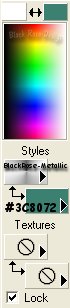
Set Your Styles Foreground Gradient To BlackRose-Metallic
Style Radial Gradient Horizontal 50 Vertical 50
Repeats 0 Invert Gradient Unchecked
And Set Your Styles Background Color To #3C8072
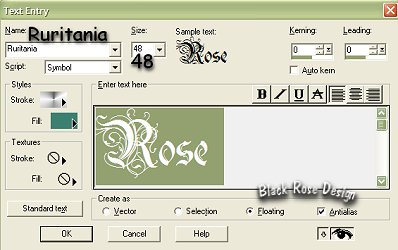
With Your Text Tool 
Click On Your Image And
Apply The Settings Below
With Your Mover Tool 
Move The Text Just Under The Butterfly
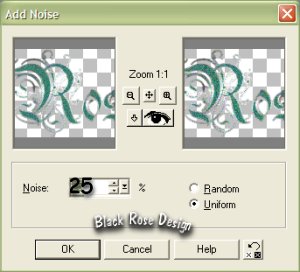
Go Up To Effects Noise Add With These Settings
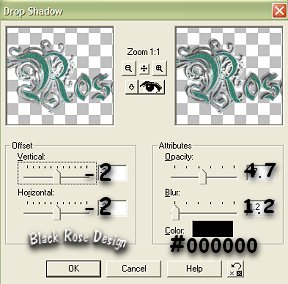
Effects 3D Effects Drop Shadow With These Settings
Effects Sharpen
Selections Select None
Layers "Merge Visible"
With The Crop Tool 
Draw Around Your Butterfly
This Is What It Should Look Like
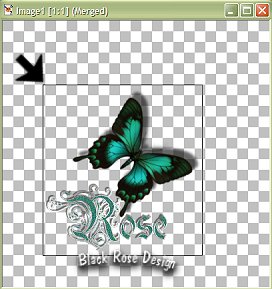
Go Up To Image Crop
Continue To Page 2
Back To Menu
Tutorial Written Dec. 12, 2002
Copyright © Black Rose Designs |