|

Finally I Have Did It.. This Is My First Tutorial
So Please Bear With Me I'm Just A Beginner At This LOL
Please Do Not Copy This Tutorial In Any Way.
This Is a Beginner Tutorial,However Some Knowledge Of Selections Is Best
To Install Your Selections To Do This Tutorial Go To C: Drive
Program Files,Find Your Jasc Paint Shop Pro Folder
Look For A Folder Called Selections And Copy The Files Ending With .sel
Into Your Selections Folder
(If You Dont Have A Selections Folder Make One) *smile*
R E Q U I R E D T H I N G S
Paint Shop Pro - Version 7
Snowman Supplies

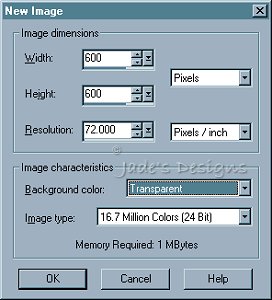
Ok Lets Begin! Open a New Image 600x600 Transparent 16.7 Million Colors
Go Up To View Normal Viewing
Add A New Raster Layer Name It Snow Man Head.
Go Up to selections Load From a Disk smowmanhead.sel
Flood Fill  With White (#FFFFFF) With White (#FFFFFF)
Selections Invert
Effects 3D Effects Drop Shadow And Apply These Settings
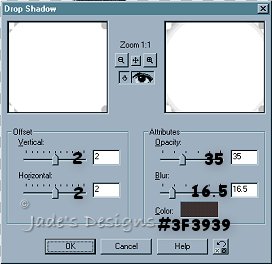
Add Another Drop shadow Same Settings Only This Time
Change Vertical To -2 And Horizontal -2
Deselect
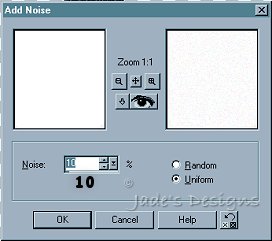
Go Up To Effects Noise Add With These Settings
Continue To Page 2

Tutorial Written Dec. 7, 2002
© Black Rose Design |