
This tutorial is for people with basic knowledge
of paint Shop Pro 8 or 9 and is done without any outside filters.
you will need to save the image and background fill
You may download them Here
Ok Lets Begin...
Open your image in paint shop pro
resize it to where its no wider than 350 pixels.
Image resize 350 the height should adjust itself
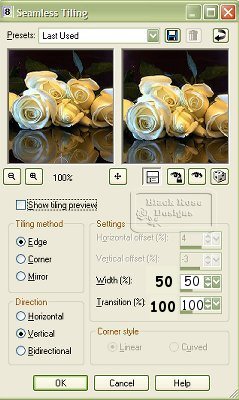
Now go up to effects seamless tiling with the following settings:
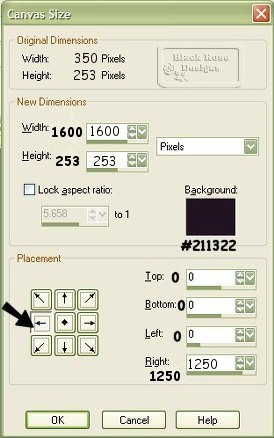
Now go up to image canvas size with the following settings:
Go up to Layers,New Raster Layer,
Name the layer Gold Bar
Grab your Selection tool

make a selection in your image like the picture below

Click on your floodfill tool

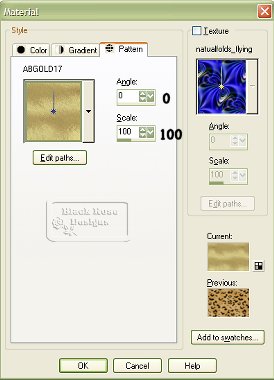
and flood fill your selection with the gold pattern
with the settings below
While still selected,
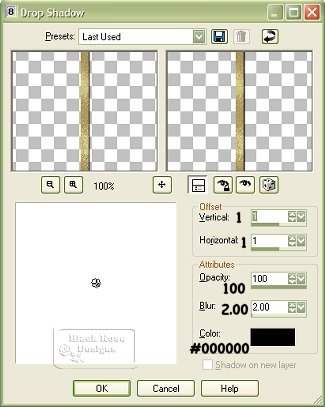
go up to Effects,drop shadow with these settings:
Go up to selections,select none
Layer,New Raster Layer,name the layer watermar
Now add your watermark if you wish to
Layer,Merge all flatten
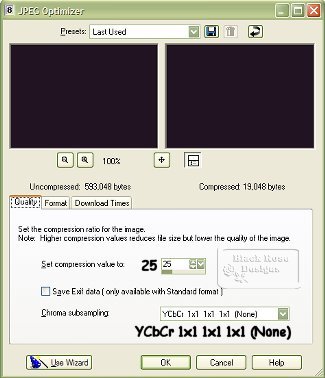
file export jpeg optimizer
with these settings:
Thats it... your all done now wasn't that fun :-)