Add A New Layer Name It Middle
Go Up To Selections Load From A Disk middle.sel
Flood Fill With White (#FFFFFF)
Selections Invert And Apply Same Drop Shadow
Apply Another Drop Shadow Only Change The Vertical To -2
And Change The Horizontal To -2
Deselect
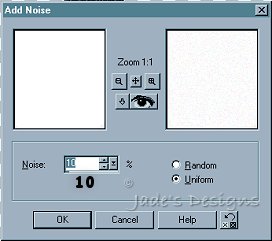
Go Up To Noise Add With These Settings
Go Up To Layers Arrange Send To Bottom
With Your Mover Tool Move The Middle Section Up A Bit
This Is What You Should Have
Add A New Layer Name It Bottom
Selections Load From A Disk bottom.sel
Flood Fill With White (#FFFFFF)
Selects Invert
Apply Drop Shadow With The Same Settings As Before
Apply Another Drop Shadow Only Change The Vertical To -2
And Change The Horizontal To -2
Deselect
Go Up To Noise Add With These Settings
Go Up To Layers Arrange Send To Bottom
With Your Mover Tool Move The Bottom Section Up A Bit
This Is What You Should Have
Turn Off Layer 1 On Your Layer Palette Make Sure Your Not On Layer 1
Merge Visible Layers Rename To Snowman
Turn Layer 1 Back On
Add A New Layer Name Ir Right Arm
Open Up arm.psp
Edit Copy
Make Sure Your Snowman Image Is Active
Paste As A New Selection
Deselect
Layers Duplicate Image Mirror Move Left Arm Into Place
Deselect
This Is What You Should Have
Add A New Layer Name It Buttons
Open Up buttons.psp
Edit Copy
Make Sure Your Snowman Image Is Active
Edit Paste As A New Selection
Deselect
Add A New Layer Name It Scarf
Open Up scarf.psp
Edit Copy
Make Sure Your Snowman Image Is Active
Paste As A New Selection
With Your Mover Tool Move The Scarf Into Place
Deselect
Go Up To Layers Merge Visible
That's it! You're all finished!
And There's Your Snowman You May Want To Resize Him :-)

 With White (#FFFFFF)
 Move The Middle Section Up A Bit


